


Copyright ©APKPanda. All Rights Reserved
Baixar Bangla - English dictionary & translator learning - v1.10

| Package Name | net.idictionary.bn |
|---|---|
| Category | APLICATIVOS, Educação |
| Latest Version | 1.10 |
| Get it On |

|
| Update | August 12, 2021 (4 years ago) |
Você já ouviu falar de Bangla - English dictionary & translator learning - v1.10, ou WordUp Vocabulary, Pydroid 3 IDE for Python 3 Premium APK v3.02 MOD APK, Miga Town: My World (MOD, All Map Desbloqueada) MOD APK,
Duolingo v5.35.4 APK + MOD (Premium/All Desbloqueada)
MOD APK, uLesson - Your Learning App, Dr. Najeeb Lectures Mod APK v1.0.13 MOD APK, um dos mais legais APLICATIVOS da categoria Educação.
E é claro que você sabe que nem todos os jogos ou aplicativos são compatíveis com todos os telefones. Às vezes, o jogo ou aplicativo não está disponível em seu dispositivo, depende da versão do sistema. Sistema operacional Android, resolução de tela ou países que o Google Play permite acesso. É por isso que o APKPanda fornece arquivos APK do Android para você baixar e não segue essas restrições.>
Bangla - English dictionary & translator learning - v1.10 a versão mais recente é 1.10, data de lançamento 2021-08-11 e tem tamanho 9.0 MB.Desenvolvido por inroza, Bangla - English dictionary & translator learning - v1.10 requer versão Android de pelo menos Android 4.2+. Portanto, você deve atualizar seu telefone se necessário.
Bastante carregado, cerca de 1000 downloads. Você pode atualizar aplicativos que foram baixados ou instalados individualmente em seu dispositivo Android, se desejar. A atualização de seus aplicativos dá a você permissão de acesso aos recursos mais recentes e melhora a segurança e estabilidade dos aplicativos.
English Language to Bangla Language dictionary and translator and English language learning. We try in Idictionary to cover all your linguistic needs and designed features and capabilities to make it possible for users to learn English easily and joyfully. Bangla Idictionary is useful for both Bangla language people to learn English language and for everyone needs a Bangla language dictionary and translator. In below we describe some of idictionary features:
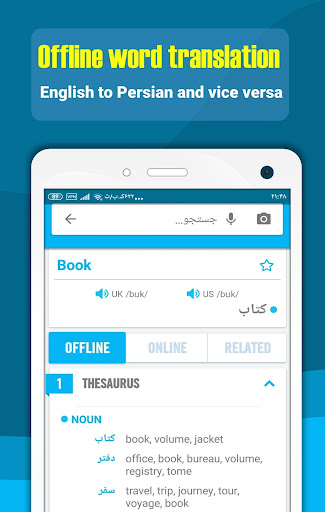
1. Offline word translation (English language to Bangla language and Bangla to English)
This capability works offline and no need to Internet connection, for translating any words, English or Bangla word, just type word in search box, then after touching magnifier icon or OK, four main sections will appear:
A. General section: in this section, Common meaning or translate of word showed. user see British and American phonetics and can listen British pronunciations and American pronunciation of word By pressing speakers, pronunciations of words in offline and online mode, for better word pronunciation need to connect to Internet. Last things exist in this sections is star, by touching it user can add word to favorite word list.
B. Offline section: In this section different meaning and synonymous of word provided, this part no need to Internet.
C. Online sections: In this section, definition of word extracted from different sources like Wordnet, google dictionary, Wikipedia etc. By reading English definition of word user understand different meaning of words and their uses.
D. Related: in this section related English example sentences, Idioms, phrasal verbs, slangs and proverbs listed.
2. Online sentence translation (to 100+ different language)
Sentence translation need to internet connection, For Translate Any sentence just insert sentences in search box and select input and output languages among about 100+ different languages and touching magnifier icon or press OK, translation simply will be appeared. User can listen to UK and USA pronunciations by clicking speakers. idictionary Translator provide translation between about 100+ different
languages, so users can easily translate any sentences in any languages.
3. English learning
Idictionary Provide Selected English language learning contents in addition to dictionary and translator. English language learning (language education) contents located in home page and ilearn section:
A. Home page: In this page, user will learn below items:
- Essential words (3000 words)
- Idioms (in two list, common idioms and full list)
- Phrasal verbs (common phrasal verbs and full list)
- Proverbs
- Slangs
- grammar
! Attention: slides in this page designed to notify user daily learning program
B. ILEARN PAGE: In this section, below learning contents provided to boost English skills easily:
- learning videos in grammar, speaking, reading, writing and listening subject. Learning videos (language education) help users to boost their language skills, Listening, speaking, writing and reading.
- Podcasts
- Articles, news and useful texts
! Attention: content in this page can filtered based on speaking, listening, reading and writing skills, for this just touch circles in top of this page
4. Smart tools
Smart tools provided to help users to use idictionary in easy and optimal way:
- Voice recognition and OCR: by these tools, for searching any words or sentences, user can read or take a photo from it instead of typing.
- Floating window: By activating this option, idictionary is in access everywhere for helping user to translate any texts in other applications.
- Instant translation: by activating this feature as user copy any text, its translation will appeared rapidly.
- Dark mode: for reading in dark places.