



Copyright ©APKPanda. All Rights Reserved
您听说过Bangla - English dictionary & translator learning - v1.10或WordUp Vocabulary, Pydroid 3 IDE for Python 3 Premium APK v3.02 MOD APK, Words Booster: Learn Languages, HSK Online — HSK Study and Exams, Miga Town: My World (MOD, All Map 已解锁) MOD APK, uLesson - Your Learning App,是类别教育 2中最酷的应用之一。
当然,您知道并非所有游戏或应用程序都兼容所有手机。游戏或应用程序有时在您的设备上不可用,这取决于系统版本。Android操作系统,屏幕分辨率或国家/地区Google Play允许访问。这就是APKPanda提供Android APK文件供您下载且不遵守这些限制的原因。>
Bangla - English dictionary & translator learning - v1.10的最新版本为1.10,发行日期为2021-08-11,大小为9.0 MB。由inroza开发,Bangla - English dictionary & translator learning - v1.10至少需要Android版本Android 4.2+。因此,如有必要,您必须更新手机。
负载量很大,大约有1000次下载。您可以根据需要更新已单独下载或安装在Android设备上的应用程序。更新应用程序使您可以访问最新功能,并提高应用程序的安全性和稳定性。
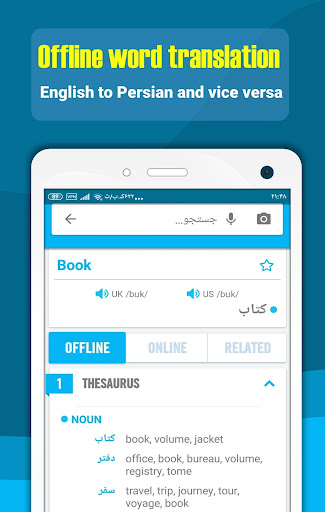
English Language to Bangla Language dictionary and translator and English language learning. We try in Idictionary to cover all your linguistic needs and designed features and capabilities to make it possible for users to learn English easily and joyfully. Bangla Idictionary is useful for both Bangla language people to learn English language and for everyone needs a Bangla language dictionary and translator. In below we describe some of idictionary features:
1. Offline word translation (English language to Bangla language and Bangla to English)
This capability works offline and no need to Internet connection, for translating any words, English or Bangla word, just type word in search box, then after touching magnifier icon or OK, four main sections will appear:
A. General section: in this section, Common meaning or translate of word showed. user see British and American phonetics and can listen British pronunciations and American pronunciation of word By pressing speakers, pronunciations of words in offline and online mode, for better word pronunciation need to connect to Internet. Last things exist in this sections is star, by touching it user can add word to favorite word list.
B. Offline section: In this section different meaning and synonymous of word provided, this part no need to Internet.
C. Online sections: In this section, definition of word extracted from different sources like Wordnet, google dictionary, Wikipedia etc. By reading English definition of word user understand different meaning of words and their uses.
D. Related: in this section related English example sentences, Idioms, phrasal verbs, slangs and proverbs listed.
2. Online sentence translation (to 100+ different language)
Sentence translation need to internet connection, For Translate Any sentence just insert sentences in search box and select input and output languages among about 100+ different languages and touching magnifier icon or press OK, translation simply will be appeared. User can listen to UK and USA pronunciations by clicking speakers. idictionary Translator provide translation between about 100+ different
languages, so users can easily translate any sentences in any languages.
3. English learning
Idictionary Provide Selected English language learning contents in addition to dictionary and translator. English language learning (language education) contents located in home page and ilearn section:
A. Home page: In this page, user will learn below items:
- Essential words (3000 words)
- Idioms (in two list, common idioms and full list)
- Phrasal verbs (common phrasal verbs and full list)
- Proverbs
- Slangs
- grammar
! Attention: slides in this page designed to notify user daily learning program
B. ILEARN PAGE: In this section, below learning contents provided to boost English skills easily:
- learning videos in grammar, speaking, reading, writing and listening subject. Learning videos (language education) help users to boost their language skills, Listening, speaking, writing and reading.
- Podcasts
- Articles, news and useful texts
! Attention: content in this page can filtered based on speaking, listening, reading and writing skills, for this just touch circles in top of this page
4. Smart tools
Smart tools provided to help users to use idictionary in easy and optimal way:
- Voice recognition and OCR: by these tools, for searching any words or sentences, user can read or take a photo from it instead of typing.
- Floating window: By activating this option, idictionary is in access everywhere for helping user to translate any texts in other applications.
- Instant translation: by activating this feature as user copy any text, its translation will appeared rapidly.
- Dark mode: for reading in dark places.