



Copyright ©APKPanda. All Rights Reserved
您听说过Futoshiki - v3.1或Magic Mansion: Match-3, Overcrowded, Hay Day Pop (充分) + MOD v1.154 MOD APK, Stencil Art - Spray Masters,
Harry Potter: Puzzles & Spells v40.0.772 MOD APK (Auto Win)
MOD APK, Merge Villa Mod (无限金钱) MOD APK,是类别益智中最酷的游戏之一。
当然,您知道并非所有游戏或应用程序都兼容所有手机。游戏或应用程序有时在您的设备上不可用,这取决于系统版本。Android操作系统,屏幕分辨率或国家/地区Google Play允许访问。这就是APKPanda提供Android APK文件供您下载且不遵守这些限制的原因。>
Futoshiki - v3.1的最新版本为3.1,发行日期为2020-12-17,大小为4.4 MB。由Aliaksandr Uvarau开发,Futoshiki - v3.1至少需要Android版本Android 4.1+。因此,如有必要,您必须更新手机。
负载量很大,大约有1000次下载。您可以根据需要更新已单独下载或安装在Android设备上的应用程序。更新应用程序使您可以访问最新功能,并提高应用程序的安全性和稳定性。
What is Futoshiki?
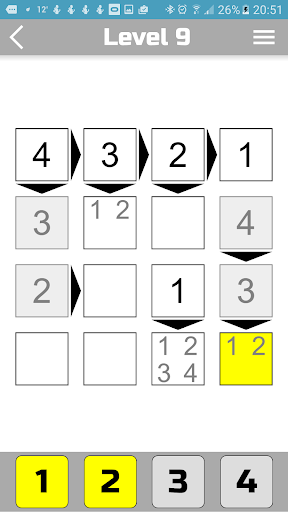
Futoshiki is a funny logic puzzle game from Japan. In this game you need to fill all cells with numbers. Some cells can be filled initially, the rest is filled by the player. The game is very similar to the game "Sudoku", but it has a difference. On the playing field, in addition to numbers, there may also be signs (more, less). The sign between two cells means that one number is greater than the other. A correctly filled square must satisfy the following three conditions:
1. The numbers in each line should not be repeated.
2. The numbers in each column should not be repeated.
3. If there are signs (arrows) on the field, then the condition must be met. (One number is smaller than the other).
Levels.
In the program you can choose 6 difficulty levels (4x4, 5x5, 6x6, 7x7, 8x8 and 9x9). The larger the square, the more difficult it is to go through. If you play Futoshiki for the first time, we recommend that you start with a 4x4 square. At each level of complexity you will be offered 2000 unique game levels. The higher the number the more difficult. (Level 2000 is the most complex).
How to play?
To change the value of a cell - first select it, and then click on the numbers at the bottom of the screen to put a number in the cell. You can put several numbers in one cell at once, but the level is considered passed, when in each cell there is only one number. If you want to remove a number from the cell, select it and click the corresponding number in the bottom of the screen.
Performance was improved.
Show more