



Copyright ©APKPanda. All Rights Reserved
Bangla - English dictionary & translator learning - v1.10 또는 Dr. Najeeb Lectures Mod APK v1.0.13 MOD APK,
Duolingo v5.35.4 APK + MOD (Premium/All 잠금 해제)
MOD APK,
LingoDeer v2.99.137 APK + MOD (Premium 잠금 해제)
MOD APK, WordUp Vocabulary, Andu Elearning, Pydroid 3 IDE for Python 3 Premium APK v3.02 MOD APK, E교육 카테고리에서 가장 멋진 애플리케이션 중 하나에 대해 들어 보셨습니다.
물론 모든 게임이나 애플리케이션이 모든 휴대 전화와 호환되는 것은 아닙니다. 게임이나 애플리케이션이 기기에서 사용할 수없는 경우도 있으며 시스템 버전에 따라 다릅니다. Android 운영 체제, 화면 해상도 또는 국가 Google Play에서 액세스를 허용합니다. APKPanda는 다운로드 할 수있는 Android APK 파일을 제공하며 이러한 제한을 고수하지 않습니다.>
Bangla - English dictionary & translator learning - v1.10 최신 버전은 1.10, 출시일은 2021-08-11이며 크기는 9.0 MB입니다.inroza에서 개발 한 Bangla - English dictionary & translator learning - v1.10는 Android 버전이 Android 4.2+ 이상이어야합니다. 따라서 필요한 경우 휴대 전화를 업데이트해야합니다.
약 1000 회 다운로드했습니다. 원하는 경우 Android 기기에 개별적으로 다운로드하거나 설치된 앱을 업데이트 할 수 있습니다. 앱을 업데이트하면 최신 기능에 대한 액세스 권한이 부여되고 애플리케이션 보안 및 안정성이 향상됩니다.
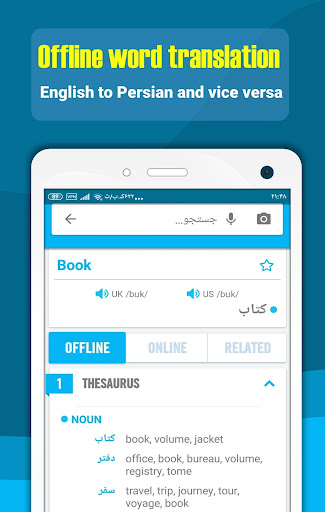
English Language to Bangla Language dictionary and translator and English language learning. We try in Idictionary to cover all your linguistic needs and designed features and capabilities to make it possible for users to learn English easily and joyfully. Bangla Idictionary is useful for both Bangla language people to learn English language and for everyone needs a Bangla language dictionary and translator. In below we describe some of idictionary features:
1. Offline word translation (English language to Bangla language and Bangla to English)
This capability works offline and no need to Internet connection, for translating any words, English or Bangla word, just type word in search box, then after touching magnifier icon or OK, four main sections will appear:
A. General section: in this section, Common meaning or translate of word showed. user see British and American phonetics and can listen British pronunciations and American pronunciation of word By pressing speakers, pronunciations of words in offline and online mode, for better word pronunciation need to connect to Internet. Last things exist in this sections is star, by touching it user can add word to favorite word list.
B. Offline section: In this section different meaning and synonymous of word provided, this part no need to Internet.
C. Online sections: In this section, definition of word extracted from different sources like Wordnet, google dictionary, Wikipedia etc. By reading English definition of word user understand different meaning of words and their uses.
D. Related: in this section related English example sentences, Idioms, phrasal verbs, slangs and proverbs listed.
2. Online sentence translation (to 100+ different language)
Sentence translation need to internet connection, For Translate Any sentence just insert sentences in search box and select input and output languages among about 100+ different languages and touching magnifier icon or press OK, translation simply will be appeared. User can listen to UK and USA pronunciations by clicking speakers. idictionary Translator provide translation between about 100+ different
languages, so users can easily translate any sentences in any languages.
3. English learning
Idictionary Provide Selected English language learning contents in addition to dictionary and translator. English language learning (language education) contents located in home page and ilearn section:
A. Home page: In this page, user will learn below items:
- Essential words (3000 words)
- Idioms (in two list, common idioms and full list)
- Phrasal verbs (common phrasal verbs and full list)
- Proverbs
- Slangs
- grammar
! Attention: slides in this page designed to notify user daily learning program
B. ILEARN PAGE: In this section, below learning contents provided to boost English skills easily:
- learning videos in grammar, speaking, reading, writing and listening subject. Learning videos (language education) help users to boost their language skills, Listening, speaking, writing and reading.
- Podcasts
- Articles, news and useful texts
! Attention: content in this page can filtered based on speaking, listening, reading and writing skills, for this just touch circles in top of this page
4. Smart tools
Smart tools provided to help users to use idictionary in easy and optimal way:
- Voice recognition and OCR: by these tools, for searching any words or sentences, user can read or take a photo from it instead of typing.
- Floating window: By activating this option, idictionary is in access everywhere for helping user to translate any texts in other applications.
- Instant translation: by activating this feature as user copy any text, its translation will appeared rapidly.
- Dark mode: for reading in dark places.